
Evaluates multivalue arguments and returns multivalue fields.
Accepts two arguments: X and Y. It splits the X field values by the delimiter, such as comma, semicolon and blank space specified in the Y field and returns a multivalue field containing a list of split values.
Syntax:
| process eval("identifier=split(X,Y)")
Example:
| process eval("split_message=split(message, ' ')")
| fields message, split_message
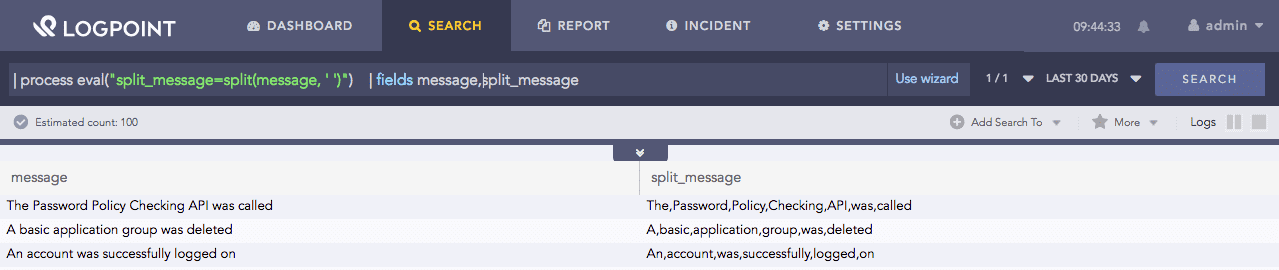
Using split function
Here, the query splits the message field’s value when the split function detects a space in the value and returns split values in the split_message identifier.
The fields command displays the value of fields and split_message in a tabular form.
When using special characters such as backslash ’\’ as a delimiter, they should be escaped.
Example:
| process eval("split_message=split(fieldname,'\\')")
| fields message, split_message
Accepts a search string X or a field that contains a search string, and returns a multivalue field containing a list of the commands used in X.
Syntax:
| process eval("identifier=commands(X)")
Example:
| process eval("commands_list=commands('chart count() | fields name | rename message as alert')")
| fields commands_list
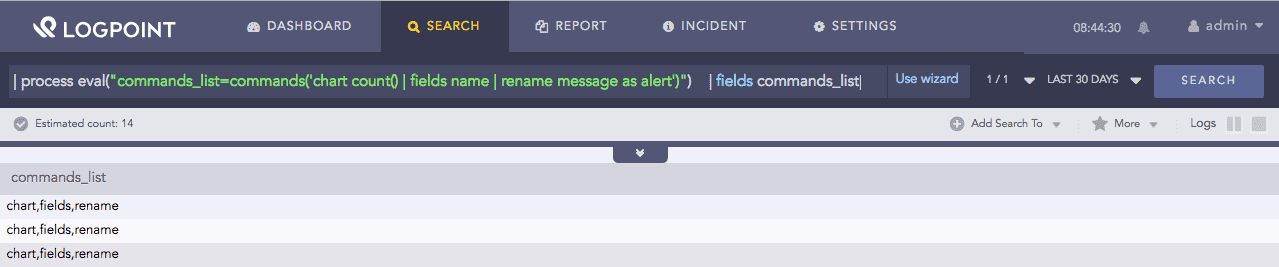
Using commands function
Here, the query first returns the list of commands in the chart count() | fields name | rename message as alert search string. Then, the query using the commands returns them in the commands_list identifier.
The fields command displays the value of commans_list in a tabular form.
Accepts two or more arguments and appends the values of the arguments. It returns a multivalue result containing a list of all the appended values. The arguments can be strings, multivalue fields or single value fields.
Syntax:
| process eval("identifier=mvappend(X, ...)")
Example:
| process eval("ip_address=mvappend(source_address, destination_address)")
| fields source_address, destination_address, ip_address
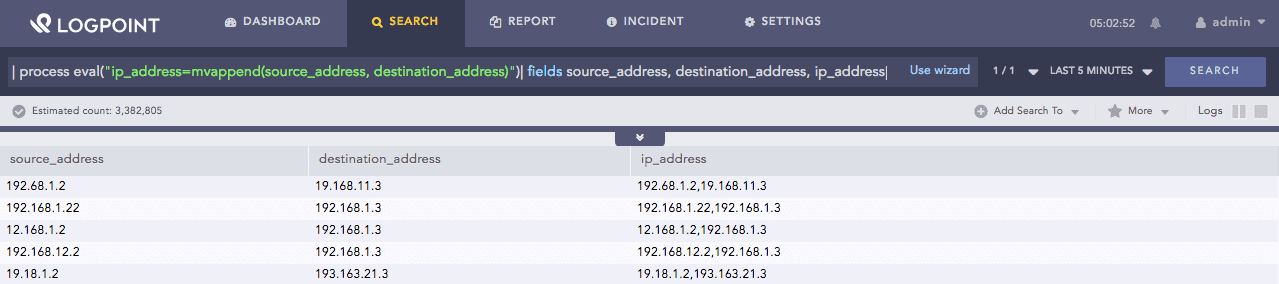
Using mvappend function
Here, the query returns the appended value of the source_addess and destination_address fields in the ip_address identifier.
The fields command displays the value of source_address, destination_address and ip_address in a tabular form.
Accepts either a multivalue field or a single value field X and returns the count of that field’s values.
Syntax:
| process eval("identifier=mvcount(X)")
Example:
| process eval("message_character_count=mvcount(split(message, ' '))")
| fields message, message_character_count
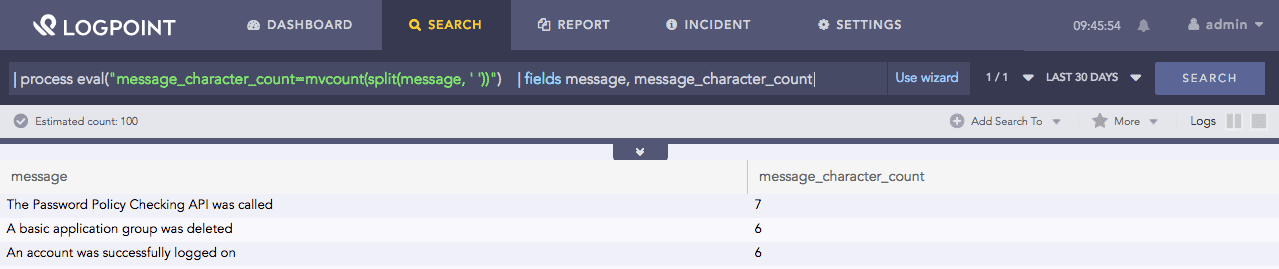
Using mvcount function
Here, the query compares the values obtained from split(message, ‘ ‘). If the values obtained from the split(message, ‘ ‘) and pattern match, it returns the matched value in the filter_account_message identifier. If they don’t match, it returns 0.
The fields command displays the value of message and message_character_count in a tabular form.
It removes duplicate values of a multivalue field X and returns a multivalue output in a list.
Syntax:
| process eval("identifier=mvdedup(X)")
Example:
| process eval("discount_ml=if(discount < 50) {return 'less discount less'}
  else {return 'more discount more'}")
| process eval("result=mvdedup(split(discount_ml, ' '))")
| fields discount, discount_ml, result
Using mvdedup function
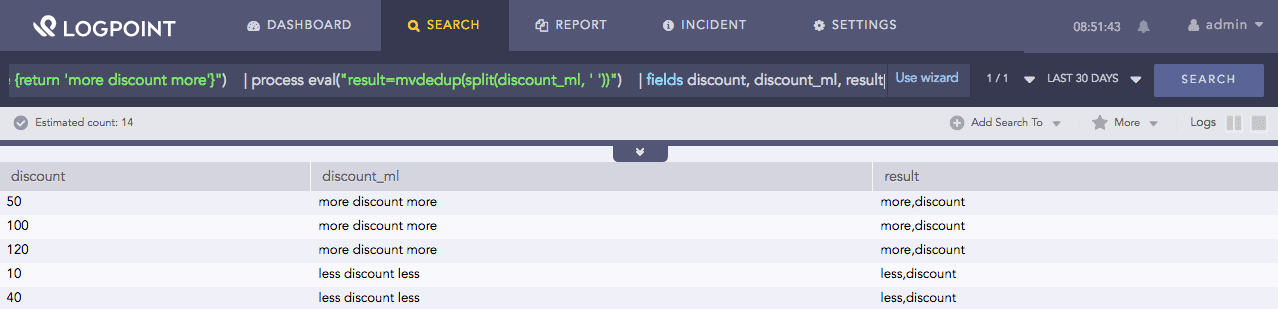
Here, the query first returns less discount less in the discount_ml identifier if discount is less than 50, if it is more it returns more discount more. The split function splits the value of discount_ml when it encounters a space. Then, the mvdeup function removes the duplicate values in the value obtained from the split(discount_ml, ‘ ‘) and returns it in the result identifier.
The fields command displays the value of discount, discount_ml and result in a tabular form.
Accepts a multivalue X field and a pattern as input. It filters the field values using the pattern and returns a multivalue or a single value field containing the list of values that match the given pattern.
Syntax:
| process eval("identifier=mvfilter(X, pattern)")
Example:
| process eval("filter_account_message=mvfilter(split(message, ' '), 'acco.*')")
| fields message, filter_account_message
Using mvfilter function
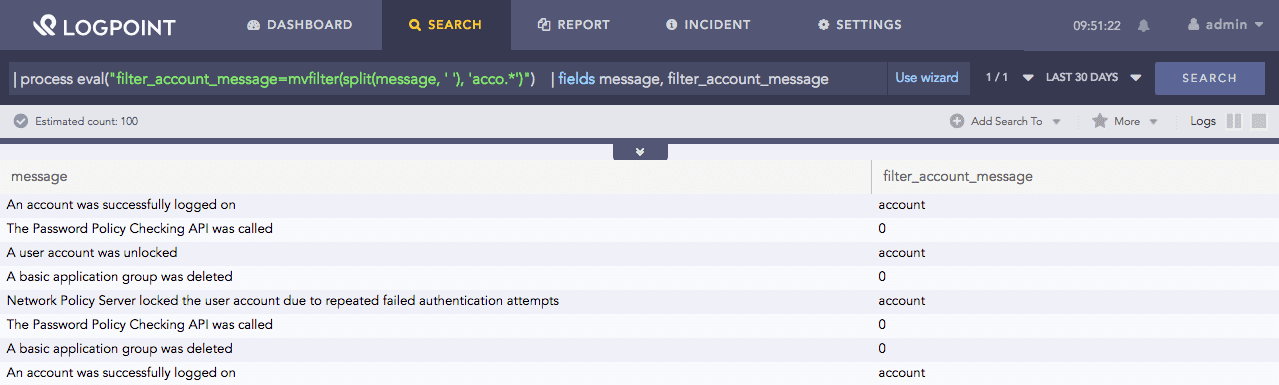
Here, the query compares the values obtained from split(message, ‘ ‘) to the pattern acco.. Any sequence of letters can follow the string acco. If the values obtained from split(message, ‘ ‘) and pattern matches, it returns the matched value in the filter_account_message identifier, if it doesn’t match it returns 0. To learn more about the split(message, ‘ ‘) value, go to split.
The fields command displays the value of fields message and filter_account_message in a tabular form.
Accepts two arguments: a multivalue X field and a regex (regular expression) pattern Y. It tries to match the regular expression against any substring of X value. If there is a match, the function returns the index (beginning from zero) of the first value that matches the regex pattern. If there isn’t a match, it returns null.
Syntax:
| process eval("identifier=mvfind(X, Y)")
Example:
| process eval("indexof_account=mvfind(split(message, ' '), 'acco.*')")
| fields message, indexof_account
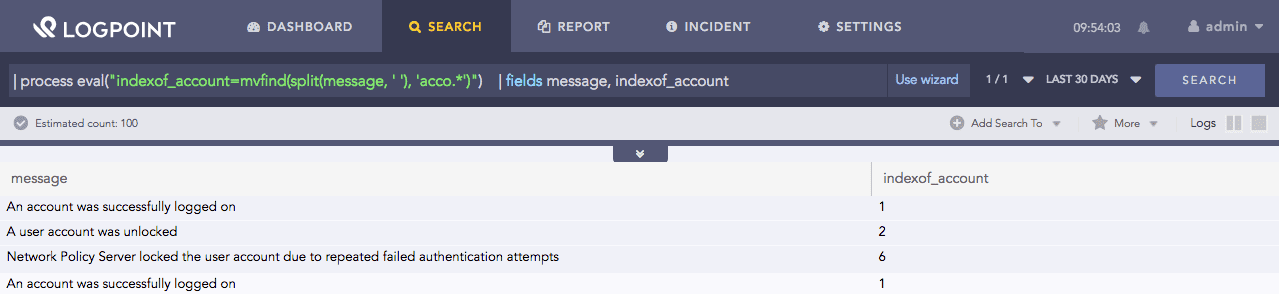
Here, the query searches for the first match in the values obtained from split(message, ‘ ‘) to the pattern acco. Any sequence of letters can follow the acco string. If the function finds a match in the values obtained from split(message, ‘ ‘) to the pattern, it returns the index (position) of the first match (index starts from zero) in the indexof_account identifier.
The fields command displays the value of fields message and **indexof_account* in a tabular form.
Using mvfind function
Accepts up to three arguments: a multivalue field X, a number start_index and a number end_index. It evaluates the values of X and returns the value that starts at the index specified by start_index and ends at the index specified by end_index.
The X field and the start_index are required. The end_index is inclusive and optional while providing positive values for both the start and end index.
If the end_index is not specified, the function returns only the value at start_index.
The start_index and end_index can be negative. Both the start_index and end_index is required while providing negative values for either the start_index or end_index.
If the indices are out of range or invalid, the result is null.
Syntax:
| process eval("identifier=mvindex(X, start_index, end_index)")
Example:
| process eval("index_message=mvindex(split(message, ' '), 2)")
| fields message, index_message
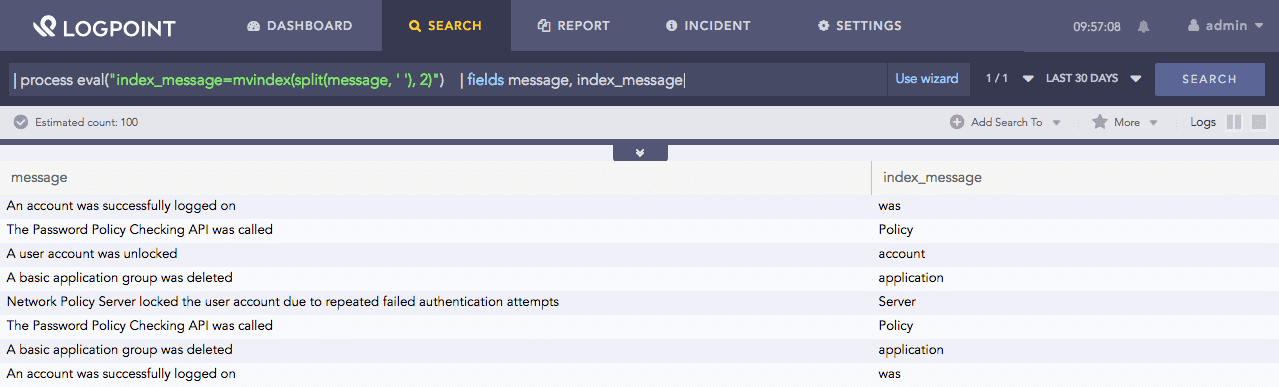
Here, the query returns the third value, where the index starts at 0, from those obtained values from split(message, ‘ ‘) in the index_message identifier.
The fields command displays the value of fields message and index_message in a tabular form.
Using mvindex function
Accepts two arguments: a multivalue X field and a string delimiter (such as comma, semicolon and blank space) Y. The function concatenates the individual values within X using the value of Y as a separator.
Syntax:
| process eval("identifier=mvjoin(X, Y)")
Example:
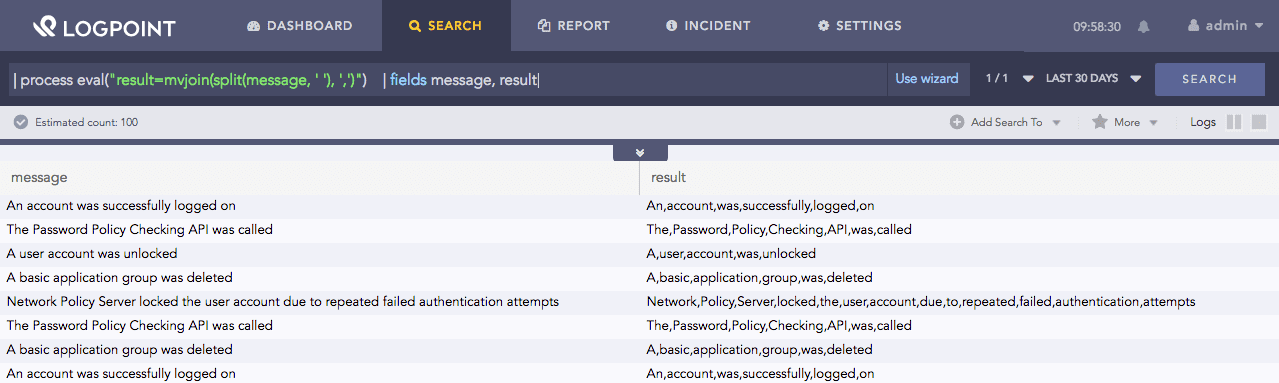
| process eval("result=mvjoin(split(message, ' '), ',')")
| fields message, result
Here, the query accepts the values from split(message, ‘ ‘) and combines them with a comma. It returns the joined values in the result identifier. Go to split to know on the value from split(message, ‘ ‘).
The fields command displays the value of the message and result in a tabular form.
Using mvjoin function
It takes up to three arguments: a starting number X, an ending number Y and an optional step increment Z. It returns the range of X and Y, where Y is excluded from the result.
If Z is not provided, the default increment step is +1.
If Z is a timespan like 1d (1 day), then X and Y are treated as UNIX time.
Syntax:
| process eval("identifier=mvrange(X, Y, Z)")
Example 1:
| process eval("range=mvrange(1,5)")

Using mvrange function
Here, the query returns the value from 1 to 5 (excluding 5) with +1 increment in the range identifier. The result is 1, 2, 3, 4.
Example 2:
| process eval("range=mvrange(1.1,5)")
Here, the query returns the value from 1.1 to 5 with +1 increment in the mvrange identifier. The result is 1.1, 2.1, 3.1, 4.1.
Example 3:
| process eval("range=mvrange(1.5,6,1.5)")
Here, the query returns the value from 1.5 to 6 (excluding 6) with +1.5 increment in the mvrange identifier. The result is 1.5, 3, 4.5.
Example 4:
| process eval("range=mvrange(1134,343434,'1d')")
Here, the query returns the value from 1134 to 343434 with +86400 increment in the mvrange identifier. The result is 1134, 87534, 173934, 260334.
Here, 1d = 86400 seconds
Example 5:
| process eval("range=mvrange(1233.124224,2434455.1232323,'1w')")
Here, the query returns the value from 1233.124224 to 2434455.1232323 with +604800 increment in the mvrange identifier. The result is 1233.124224, 606033.124224, 1210833.1242240001, 1815633.1242240001, 2420433.124224.
Here, 1w = 604800 seconds
Accepts a multivalue X field and returns a multivalue field containing the list of values of X sorted in lexicographical or alphabetical order.
In lexicographical order, numbers are ordered by digits and come before letters. If the first digits match, the second digits get compared. The comparison is like a string. For example, 10 comes before 2, but 111 comes after 10 (and after 1000) because 0 is less than 1. A lexical sort compares the characters in each string as characters, not integral values.
All uppercase letters comes before lowercase.
Syntax:
| process eval("identifier=mvsort(X)")
Example 1:
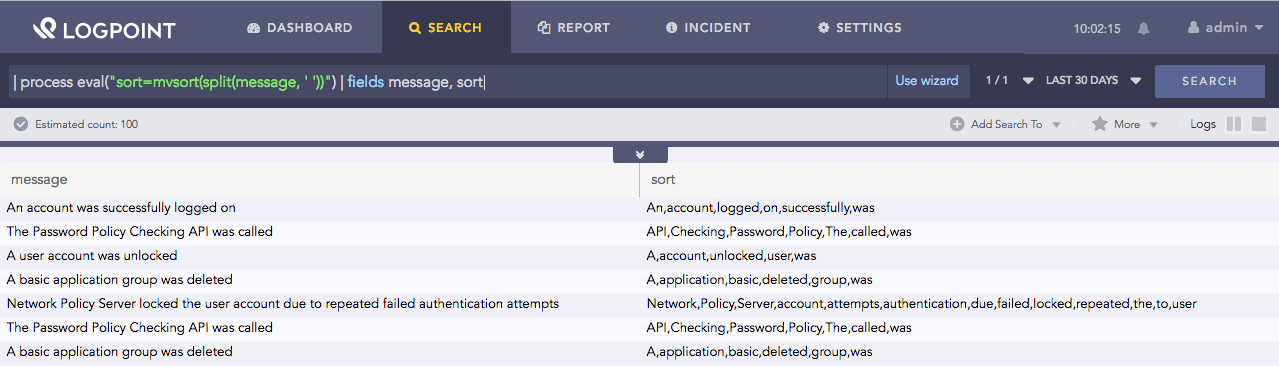
| process eval("sort=mvsort(split(message, ' '))") | fields message, sort
Using mvsort function
Here, the query accepts the values from split(message, ‘ ‘) and sorts them according to lexicographical rules. It returns the sorted value in the sort=mvsort identifier.
The fields command displays the value of the message and sort in a tabular form.
Example 2:
If testData = {“test1”, 1, 1.2}
| process eval("sort=mvsort(testData)")
Here, the query sorts the data in the testData field according to lexicographical rules. It returns the sorted value in the sort identifier. The result is [1, 1.2, “test1”].
Accepts up to three arguments: two multivalue X and Y fields and an optional delimiter Z. It combines the first values of X and Y, the second values of X and Y, and so on. Z separates the values of X and Y. The comma is a default delimiter.
Syntax:
| process eval("identifier=mvzip(X,Y,Z)")
Example 1:
If users = [“john”, “jack”, “kim”], machines = [“lp1”, “lp2”, “lp3”]
| process eval("x=mvzip(users,machines)")
Here, the query accepts the users and machines field values. It combines the first, second, and third values of the user field, respectively, with that of the machines field. A comma separates the combined values. It returns the combined value in the X identifier.
Result: [“john,lp1”, “jack,lp2”, “kim,lp3”]